
Transcript vs Subtitles: Which Text Export Do You Need?
Choose a transcript when readers need the conversation as readable text. Choose subtitles or captions when text must appear alongside video at specific times. A timestamped transcript can help navigation, but it is not automatically a valid subtitle file. To transcribe video to text, recognize the spoken audio. To extract text from video images, you need a separate text-recognition workflow. Decide the reader's task before choosing TXT, SRT or VTT.
In this guide
Choose the matching AENural download
The audio-to-text converter can produce a reviewed source for several deliverables. Select Upload Audio, set Spoken Language, leave Text Language at Same as spoken language for source transcription, and choose Convert to Text. Correct the words under Review your transcript before choosing an export.
- Choose Download TXT for a reading copy. Inspect paragraph breaks and speaker changes afterward; a useful transcript should read as a conversation rather than an arbitrary collection of screen-sized fragments.
- Choose Download SRT when an editor or upload form requests timed SubRip captions. Check both Start and End values, cue lengths and alignment with the exact final recording.
- Choose Download VTT for a compatible WebVTT destination, including a native HTML text track. Test the destination’s caption control and supported formatting rather than assuming all players display it identically.
For example, a workshop handout might contain a paragraph labelled 05:12 so readers can locate the explanation. Its companion video needs shorter timed cues covering that explanation, including when each should disappear. Keep both outputs if readers need both experiences; neither file replaces the other.
If you already have reviewed subtitles, use SRT to TXT to extract their words without running recognition again. The conversion saves retyping, while your editorial review supplies the readable structure.
Match the export to the reader's task
| Output | Best suited to | Timing detail |
|---|---|---|
| Reading transcript | Search, quotations, notes and paragraph-based review. | Optional navigation times may be enough. |
| Timestamped transcript | Finding a passage in a long recording. | Usually references points rather than every display interval. |
| Subtitle/caption file | Synchronized playback. | Cues need start and end times in the target format. |
A transcript with headings and paragraph timestamps can be easier to read than hundreds of cue-sized fragments. Conversely, those paragraphs may be too long for video captions. Neither version should be called better without considering its intended use.
A time reference is not a display interval
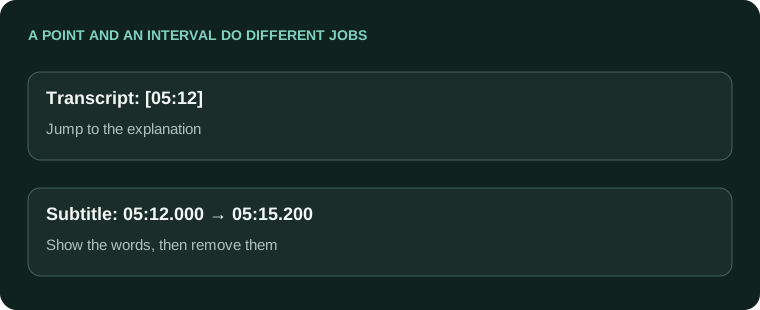
Transcript navigation: [05:12] The guest explains the revised workflow.
Subtitle cue: 00:05:12,000 --> 00:05:15,200
The revised workflow starts here.
The transcript label tells a reader where a section begins. The subtitle times tell a player when text enters and leaves the screen. Converting one into the other requires meaningful segmentation and timing, not simply changing the extension.
Include the context needed by the text reader
W3C's transcript guidance distinguishes basic audio transcripts from descriptive transcripts that also convey needed visual information. A screen-recording transcript may need a clearly labeled description of an important diagram or action that nobody said aloud.
Keep descriptions separate from quotations. For example, an editorial note identifying a displayed chart should not be attributed as spoken words. Verify speaker names and any external references rather than guessing from the surrounding topic.
Keep one reviewed source, then make appropriate exports
- Review the conversation for names, figures, speaker changes and uncertain words.
- Prepare a readable paragraph version if readers need a transcript.
- Prepare timed cues separately when the task is playback, keeping them aligned to the final video.
- Check each actual export in its intended reading or playback context.
If you already have captions, SRT to TXT or VTT to TXT can extract their words. Review paragraph grouping afterward. If the job is caption delivery, keep the timed master and use the destination's required format rather than treating TXT as a subtitle file.
- The file's label matches its purpose.
- Quotations remain faithful to the recording.
- Required visual or audio context is included appropriately.
- Timed outputs were tested with the final media.
Choosing the text export your reader needs
My transcript has chapter times. Why is it not a valid SRT?
Chapter references help navigation, but an SRT needs individual cue starts and ends in its expected structure. Keep a reading transcript for reading and prepare measured timed captions when the text must accompany playback.
Why is an SRT hard to read as a normal interview document?
It is divided into short timed cues rather than document paragraphs. Use SRT to TXT for a reading copy, then review speaker and paragraph boundaries. Keep the subtitle master so timing is not lost.
Can I export Premiere's transcript as SRT without creating captions?
A transcript export and a caption-track export are different workflows. Create and review the caption track when you need SRT. Do not assume timecoded text is already the subtitle structure the next application expects.
Should I send TXT or SRT to a podcast host?
Check the host's current accepted formats and intended display. A reading document and synchronized transcript feed serve different needs. Test the actual upload rather than assuming a .txt file can replace a required SRT or VTT.
Can a transcript preserve who is speaking better than subtitles?
It can use names and paragraphs more freely, but those identities still need verification. Subtitles can also include useful labels. Choose the presentation for the reader's task rather than assuming one export automatically detects speakers.
Is a subtitle file a complete record of everything important in the video?
Not always. It may focus on speech, omit useful sounds or belong to a different edit. Check its brief and contents. Visual information needed for understanding may require a separate descriptive transcript or other accessibility treatment.
Will a TXT export keep every cue's timing for future clips?
Not when those timestamps have been removed. Preserve SRT/VTT alongside the reading copy. That prevents a later editor from having to reconstruct time references from the text alone.
Why do viewers see different words in captions and the transcript?
They may be different tracks or revisions, or one may be an edited reading copy. Compare a known correction and label each version. Do not silently publish a paraphrase as if it were verbatim speech.
Can I use the transcript to make show notes without publishing every word?
Yes. Treat show notes as a separately checked summary with real resource links and chapter times. Keep quotations faithful and review the recording where claims are uncertain. A transcript is evidence, not an automatic factual guarantee.
Which exports should I keep after reviewing a recording in AENural?
Keep TXT when you need readable notes and SRT/VTT when you need timed text. Save the matching recording too. Review formatting and playback separately rather than approving all deliverables from one preview.