
MP4 Transcription Not Working? Check the Audio Track First
When MP4 transcription fails in a video-to-text converter, first play the file and confirm it contains intelligible speech on the intended audio track. MP4 is a container, not a guarantee of a particular audio codec or even an audio stream. Separate decoding, track-selection and speech-recognition problems before trying another export.
In this guide
Test the supported audio copy in AENural
Use the exported recording to isolate the input problem. AENural’s audio transcription page is an audio-file workflow; do not assume that selecting an arbitrary MP4 there is the same as importing it into a video editor.
- Open the audio-to-text converter, select Upload Audio, and choose the supported audio copy you have already played independently.
- Check Recording ready and the duration. If that stage fails, record the decoder or input error. Changing the spoken language cannot repair a missing or unreadable audio stream.
- Once the recording opens, choose Spoken Language and retain Same as spoken language under Text Language. Select Convert to Text.
- Review the generated words against the same audio copy, then download the required TXT, SRT or VTT. Compare the final spoken sentence to ensure the transcript did not stop during a long silent gap.
Consider an illustrative export that contains a thirty-second silent title followed by an interview. A short test taken only from the title will correctly reveal no speech, even though the later recording is useful. Choose a sample containing the conversation before concluding that recognition is broken.
If the independent audio plays correctly but the tool still rejects it, preserve the exact error and one documented export configuration. That gives you a reproducible import issue instead of a growing collection of differently re-encoded files.
Start with an independent playback check
- Open the exact file being transcribed, not another version in the editing timeline.
- Listen near the beginning, middle and end, checking volume and the active language track.
- Confirm the exported range includes the conversation and not only a silent intro.
- If the file is silent, inspect the source project's audio routing and export settings before retrying.
A working video picture does not prove its audio can be read by every application. MDN's media-container guide explains the distinction between the container and encoded streams.
Classify what actually failed
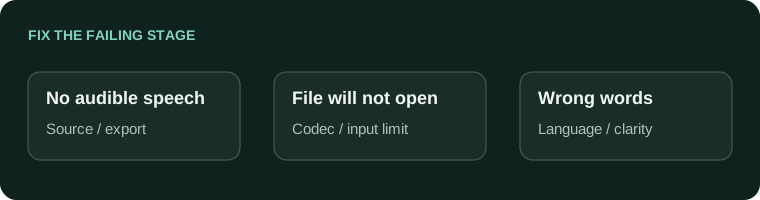
- The video has no speech in any player
- Fix the source/exportA recognizer cannot recover an audio track that was not included.
- It plays elsewhere but import fails
- Check supported codecs and limitsPrepare one documented compatible copy, preserving the original.
- Transcription runs but words are wrong
- Review language and intelligibilityThe file may be readable while the speech remains difficult.
If several audio streams exist, check which one the tool selected or supports. A soundtrack, commentary track and dialogue mix are not equivalent inputs. Record what was selected so a later reviewer can reproduce the result.
Prepare a supported audio copy when necessary
Use an editor that already opens the source reliably and export the intended audio mix in a format accepted by the transcription tool. Check the range and duration again. Adobe's audio/video export guide is one official reference for controlled sequence exports.
Do not repeatedly convert the same compressed copy through several formats. That makes it harder to identify the original failure and may damage audio. Keep one clear source-to-export path and write down the settings.
Verify after the first successful run
- The full intended conversation is present.
- The chosen language and audio track are correct.
- The transcript ending matches the end of the speech.
- Names and figures are checked against the source, not a re-encoded guess.
For a supported audio copy, the audio-to-text converter provides a relevant next step. If you need help creating that copy, use the audio extraction guide. Fix the input cause before spending time correcting a transcript of the wrong track.
MP4 transcription when speech is missing
My MP4 picture plays. Why is there nothing to transcribe?
Confirm it actually contains intelligible speech on the intended audio track. Video playback does not establish that audio exists or can be decoded. Inspect the sound separately before changing language or recognition settings.
Can a transcription tool recover audio that was never saved with a screen recording?
No. Return to the original capture or another authorized recording. An MP4 with no audio stream cannot supply missing speech, and changing the extension or selecting a larger model will not create it.
The clip has sound in a player but not my editor. Is it corrupt?
Not necessarily. Check audio codec support, track selection and the editor's channel or timeline settings. Test the same original in another compatible app before deciding to replace or repeatedly re-encode it.
Should I convert the video to WAV before trying anything else?
First identify whether the sound exists and which restriction is failing. A compatible audio-only export can help with decoding, but it cannot fix an absent track. Preserve the original and test a short, known spoken passage.
Why does the transcript follow the wrong language track?
The selected or exported audio may not be the intended dialogue. Listen to the input itself and choose the correct source track. The text-language setting is not a substitute for selecting the recording you mean to transcribe.
Can music trigger a transcript even when nobody speaks?
Automatic recognition can produce unsupported text around non-speech audio. Review the recording and remove invented words. A generated paragraph is not evidence that a silent or music-only source contained a conversation.
Why is the beginning transcribed but a clearly audible middle section missing?
Compare that passage with the source and check for music, speaker overlap, track changes or recognition failure. Test the affected section separately. Do not assume the existing text proves the whole recording was processed correctly.
Does choosing MP4 guarantee a supported audio codec?
No. MP4 describes a container, not one fixed audio encoding. Check the actual stream and the receiving tool's support. A supported filename extension is only one part of a successful input.
What should I do if AENural's audio input rejects my video file?
Use a supported audio export from the intended recording rather than forcing the video through an audio-only picker. Confirm the exported sound and duration, then choose it with Upload Audio.
How can I tell an import failure from a transcription mistake?
An import/decoding failure prevents usable audio from reaching recognition. A transcription mistake happens after speech is processed. Note the stage and exact message, then troubleshoot file support or wording accordingly instead of changing every setting at once.