
Subtitle Delivery Checklist: Check the File, the Video and the Handoff
Before delivering subtitles, check the SRT file or VTT file, the matching video and the app that will play them separately. Verify wording, timing, language labels and any intended visual style, then keep a short revision record. A parser pass or a successful download is only one part of a complete subtitle review.
In this guide
Run a concrete file review in AENural
- Open AENural’s Subtitle Editor, select Upload subtitle file and choose the exact file named in the delivery record. Keep the approved video revision available for comparison.
- Inspect Subtitle text, Start and End at the opening, a recent edit and the closing passage. Check a deliberately corrected name or figure to confirm this is the reviewed revision.
- Use Issues, Next issue or Previous issue to inspect flagged cues. A reading-speed warning needs context; an invalid end time needs correction before export. Do not clear a warning by silently changing meaning.
- Select Download SRT or Download VTT for the intended receiver. Reopen the saved copy and test it with the actual final video, including the selected language track.
If a timing repair was needed, record which cues changed and why. A whole-file delay, a chapter-offset error and one overlapping pair require different operations. Use the appropriate AENural timing or overlap tool, then return to playback review rather than assuming a lower warning count certifies the file.
For an illustrative client handoff, the file may pass syntax and text review while receiver playback is still pending. Write that exact status in the record. The recipient can then complete the missing check without mistaking a preparation step for approval.
Keep the editable project, source captions, reviewed export and a short change log. Those assets let a later editor correct one spelling or timing issue without rebuilding an entire caption workflow.
Check meaning before technical packaging
- Names, figures, dates and negations match the recording.
- Speaker identities and relevant sounds are represented accurately.
- Uncertain passages have been resolved or clearly marked for review.
- Translations have competent target-language review.
Prioritize errors that change meaning before polishing a border or filename. Keep the original transcript and subtitle master so intentional editorial changes remain distinguishable from recognition mistakes. Do not label an unchecked automatic export as a reviewed transcript.
Check the exact final edit
- Confirm the approved video revision and subtitle time origin.
- Inspect the opening, several middle checkpoints and the ending.
- Review every recent cut, chapter join and intentionally changed cue.
- Check dense captions, accidental overlaps and cues crossing boundaries.
A few checkpoints are useful for finding broad problems, but they do not certify every line. Combine them with review of changed and difficult passages. For symptoms, use the existing subtitle sync guide, then verify the repaired section in context.
Check the export, not just the editor
| Gate | Inspect |
|---|---|
| File structure | Correct extension, encoding, valid times and complete cue range. |
| Visual appearance | Readable size, line breaks, fonts and placement in the delivered output. |
| Language selection | Track contents match labels and filenames. |
| Destination playback | Actual sidecar loading, selectable tracks or permanent text as requested. |
For a YouTube delivery, check its official supported-file guidance; other receivers can have different feature subsets. Keep rich-style masters even when delivering a plain SRT. A file can import successfully while its design details are discarded.
Leave a compact, useful handoff record
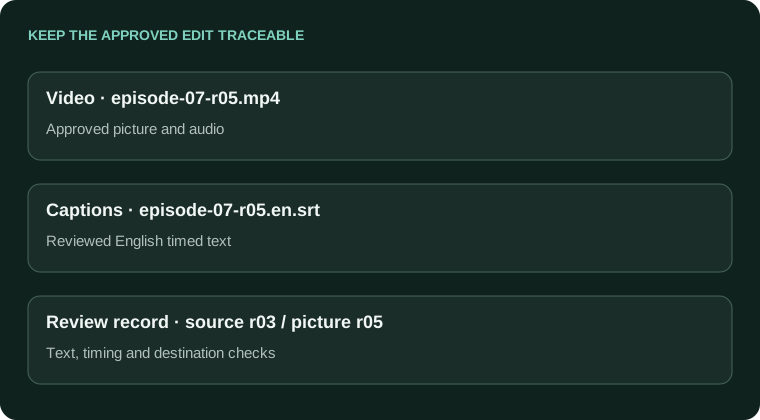
Video: episode-07-r05.mp4
Captions: episode-07-r05.en.srt
Language: English
Source: reviewed transcript r03
Timing reference: approved picture r05
Review: text + timing complete; receiving-platform playback checked
Retained: editable project, subtitle master and change log
Replace each example status with what actually happened. If receiver playback is still pending, say so. Do not make a checklist look complete merely because the file exists.
Use the Subtitle Editor for final supported text/timing fixes and keep exported copies separately. A clear handoff makes the next correction safer: collaborators can identify the approved version rather than guessing which of several similar files should be changed.
Client revisions, consistency and final-file checks
Our editors keep getting different punctuation notes. How do we make captions consistent?
Agree a short project style sheet covering names, punctuation, casing, sound cues and exceptions. Use the client's actual feedback to refine it. Have every editor check against the same brief before exporting another revision.
How do I prove the delivered SRT contains the correction the client approved?
Check a deliberately corrected phrase in the saved file and its playback, not just the project preview. Tie the filename to the approved edit and keep a compact change record so everyone can identify the intended revision.
The file passes a validator. What else could still be wrong?
It can contain misheard words, wrong speaker labels, an old cut, unreadable timing or the wrong language. A parser checks structure, not the entire viewing experience. Review text, media match and destination playback separately.
Should every editor invent their own caption timing and line-length rules?
Follow the agreed destination and client requirements, then document exceptions. Personal preferences can conflict across a team. Avoid treating a rule of thumb from one forum or service as the standard for every project.
What if the video changed after the subtitle approval?
Review the affected wording and timeline before treating approval as current. New intros, cuts, ads and speed changes can invalidate times. Keep the caption master linked to a specific video revision rather than only a project name.
How do I check multiple languages without mixing up the files?
Use explicit language and revision names, verify a distinctive phrase and keep each approved track separately. Ask competent readers to check their target languages. Matching filenames or cue counts alone do not establish correct meaning.
Should I send only a burned-in video when the client asks for editable captions?
Clarify and provide the required editable timed-text asset. A burned image does not replace an SRT/VTT or project handoff. Keep the clean picture master when future language or style changes are part of the job.
Can automated QA replace replaying the important passages?
No. Use issue checks to find technical problems, then inspect the recording and actual output. Pay particular attention to names, numbers, quotations, speaker changes and recent edits. An empty issue list is not a factual or accessibility review.
What should the handoff note say without becoming a huge report?
Name the video revision, language, subtitle format, review status and any unresolved passage. Mention intentional exceptions and required playback behavior. That gives the receiver enough context to avoid silently using the wrong file or assumption.
Where should I make the last small text fix in AENural?
Open the exact delivery file in Subtitle Editor, correct Subtitle text, inspect its neighbors and download a new named revision. Reopen that output and update any separate styled project or reference that also needs the correction.