
Subtitles in After Effects: Plan the SRT-to-Text-Layer Handoff
For subtitles in After Effects, decide whether you need editable animated text layers or a conventional caption deliverable. Keep a reviewed SRT file outside the composition. If a script or extension turns SRT into layers, verify its timing and text on a small sample before using it across a long sequence.
In this guide
Prepare and check a small handoff with AENural
- Open AENural’s Subtitle Editor, select Upload subtitle file and load the SRT master. Correct Subtitle text and inspect Start/End before creating any composition layers.
- Select Download SRT to save the reviewed revision. For a test, download the original two-cue sample and inspect its exact times.
- For a short manual After Effects test, create one editable text layer for each sample sentence. At a matching zero origin, the first belongs from 1.250 to 3.750 seconds and the second from 4.000 to 6.500 seconds.
- Compare both layer intervals and words with the SRT. If your composition begins at a different source point, account for that origin once before extending the handoff to more cues.
These sample intervals give you something concrete to check when evaluating an existing importer. A test should retain the silence between the two sentences and the gap before the first. An importer that puts every layer directly after the previous one would lose those pauses even if all words appeared.
There is no AENural After Effects subtitle-import plugin promised here. Use your chosen documented handoff or a manageable manual method, retain the timed master and record which revision created the layers.
Choose the handoff for the job
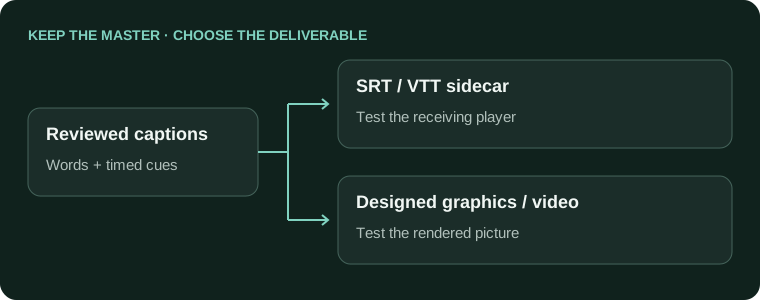
- A long video needs ordinary selectable captions
- Keep a caption-track workflowUse an editor or player workflow designed for the required subtitle deliverable.
- A short sequence needs custom animated text
- Build editable text layersPreserve a separate timed-text master for correction and delivery.
Do not assume importing a file named .srt automatically creates a native caption track in every version of After Effects. Adobe's supported-format reference is the place to check current import support; a third-party panel can add behavior beyond the native application.
Validate an importer with a short fixture
- Prepare a reviewed SRT containing a short cue, a multiline cue and a later cue separated by silence.
- Import using the documented script/extension workflow you have chosen, or create the layers manually for a short sequence.
- Compare each layer's text and in/out points with the subtitle source.
- Check quotation marks, non-Latin text, line breaks and the composition's time origin before scaling up.
Subtitle cue: 00:00:05,250 --> 00:00:07,000
Expected composition interval at the same zero origin: 5.250 → 7.000 seconds
A composition offset must be accounted for exactly once.
Review permissions and source trust before installing any importer. Do not run an unknown script merely because it promises free captions, and do not use a paid extension as an assumed requirement of this workflow.
Style a representative set of layers
Adobe's text animation guide documents text-layer animators and selectors. These operate on composition text; they do not independently verify the transcript or restore missing subtitle timings.
Test the longest line before applying a style everywhere. Check paragraph-box dimensions, alignment and changes caused by replacement fonts. A style that fits three words may clip a long translated sentence, even when every layer imported successfully.
Deliver the right assets
- Layer timings match the final composition/audio origin.
- The exported picture has no clipped or missing words.
- Required fonts and project dependencies are accounted for.
- A reviewed sidecar file is retained when the receiver needs selectable captions.
Use the Subtitle Editor to correct the source timed text before import. A video render of animated words is useful, but it is not automatically an SRT or a selectable caption track for the receiving platform.
Getting reviewed captions into an AE composition
Why can't I import SRT into After Effects like ordinary footage?
Do not assume it is a native editable-text import. Choose a documented text-layer handoff or an appropriately reviewed script workflow for your version. Keep the SRT outside the composition as the timed master.
Can I bring Premiere captions into AE as editable text?
A graphics handoff may be useful, but test the resulting layers, precomps and timing on a short sequence. Preserve the caption track and SRT first. An imported visual treatment is not automatically an interchangeable subtitle master.
Is a transparent caption render the same as editable text layers?
No. A rendered overlay carries pixels, not independently editable words. Choose it when the approved look matters more than editing each caption in AE, and preserve the text source for later corrections.
Should I run any SRT-import script someone links in a comment?
No. Review its source, permissions, compatibility and license, and test in a disposable project. Keep backups. A community recommendation is a lead to investigate, not proof that a downloaded script is safe or correct.
The script worked for another frame rate. Can I trust my full project?
Test your own composition and source timings, including noninteger frame rates where relevant. Compare early, middle and late cues. Another user's success with one file does not verify rounding or placement for your complete project.
Why did my captions arrive as many precomps instead of simple layers?
That can be part of the chosen handoff's structure. Inspect how text, timing and styling are nested before changing it. Test whether your editing workflow can make a correction reliably without damaging the original caption master.
Can AENural prepare the subtitle file before I use an AE script?
Yes. Review supported SRT text and times in Subtitle Editor, then download the corrected source. This improves the handoff file; it does not install an AE importer or validate an unrelated script's behavior.
Why do I still need the original SRT after every cue becomes a text layer?
The composition may be awkward to export back into a subtitle track. Keep the timed-text master for corrections, translations and selectable delivery. Motion layers and caption files serve different editing and publishing tasks.
What should I check before importing hundreds of captions?
Use a short sample with a long line, accented name and gap. Compare layer in/out points with the source and preview the result. Establish that the handoff works before committing the full sequence.
Does changing an AE text layer also update the subtitle file I sent the client?
No. Reconcile the correction in the SRT master explicitly and issue a clearly named revision. Otherwise the motion project and selectable captions can disagree while both appear to be the latest version.