
Premiere Caption Styles vs Animation: Preserve a Subtitle Master
To add captions to video in Premiere, use a track style to keep font, color and placement consistent. Use an appropriate graphics workflow when you need motion beyond that caption presentation. Preserve a reviewed caption master before converting to graphics so a styled social export does not leave you without an editable subtitle deliverable.
In this guide
Keep text correction separate from the graphics design
Adobe’s current caption-style workflow selects caption text in the Timeline and adjusts its appearance through Properties. To save the look, use the plus control beside Track style, choose Create style and name it. These appearance settings should not be confused with a word-by-word motion treatment.
- Finish one short caption track and save an SRT master. Open that file in AENural’s Subtitle Editor with Upload subtitle file to inspect the words and exact timing separately from the design.
- Choose a short line, a long line and a cue over important graphics for the styled test. Apply the intended Premiere track style and inspect wrapping and placement.
- Preserve the caption sequence before making a graphics version. Test the supported upgrade workflow and motion on that separate version.
- When a spelling correction is needed, update the reviewed text and deliberately reconcile the graphics copy. Export and check both the sidecar and rendered video.
Suppose a client changes a product name after the animation is built. Editing the SRT in AENural and selecting Download SRT gives you a corrected timed master, but it does not reach into Premiere and replace existing graphic-layer text. Track that handoff explicitly. A plain SRT cannot document the finished animation’s actual appearance. Keeping two truthful deliverables is more useful than claiming one animated export automatically preserves every caption workflow.
Separate appearance from movement
| Task | What to preserve |
|---|---|
| Make all captions use one readable look | A track style and caption text/timing. |
| Animate words, position or scale | A caption master plus a separate graphics treatment. |
| Deliver SRT and an animated video | Both the subtitle export and finished video; one does not replace the other. |
Adobe's caption-style documentation describes Properties-based appearance and reusable styles. It should not be read as a promise that every saved caption style contains word-level animation.
Keep the master before upgrading graphics
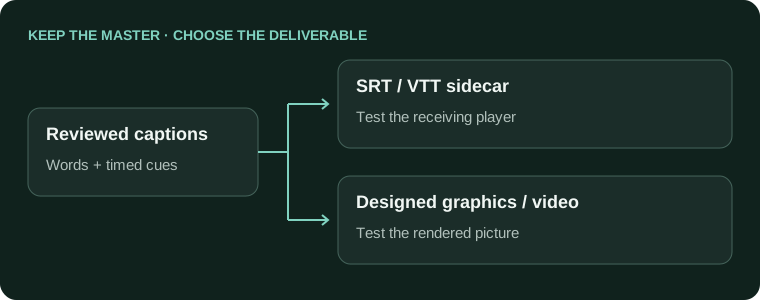
- Finish a text and timing review on a caption track.
- Duplicate the sequence or otherwise preserve the caption version.
- For a graphics treatment, use the supported caption-to-graphic workflow in your installed release and test it on a short selection.
- Apply motion to representative short and long blocks, then check the exported video.
Adobe's community workflow discussion describes upgrading captions to graphics for effect controls. Menu names can change; verify the command in your release. Graphics should not be assumed to retain the same caption-export behavior as the original track.
Make motion support the words
Use motion to establish emphasis or rhythm while leaving a stable reading interval. A word that spends most of its display time entering, bouncing or fading may be harder to read even if its nominal duration looks generous. Avoid making every cue a different effect demonstration.
Cue display: 2.5 seconds
Entrance: 0.2 seconds
Stable reading: 2.1 seconds
Exit: 0.2 seconds
Test the actual text; these values are an example, not a reading standard.
Do not derive exact word timings merely by distributing a phrase's duration evenly across its words. Phrase-level SRT timings do not establish where every spoken word begins.
Review both deliverables
- The SRT master still exists and exports correctly.
- Animation does not obscure or truncate a long caption.
- Caption placement survives the final aspect ratio.
- Rendered words and audio remain aligned in the exported video.
For text changes, edit the master and reconcile the graphics version deliberately. The subtitle line-break guide for existing caption files can help with segmentation before animation. Keep the workflow understandable enough that one spelling correction does not require rebuilding the whole design.
Caption styling, graphics and reusable motion
Why won't my animated text clip's attributes paste cleanly onto captions?
Caption events and graphics are different objects. Use caption styling for a consistent track appearance. If motion requires graphics, preserve the caption version first and test the conversion on a short selection.
Will saving a caption style also save my word-by-word animation?
Do not treat a track appearance style as a complete motion preset. Check which properties are actually stored and which belong to graphics or effects. Keep the approved animation project separately from the timed subtitle master.
Should I upgrade every caption to graphics before finishing text corrections?
Finish wording and basic timing first where practical. Preserve a caption copy before upgrading. A late correction may need to be reconciled across both versions, so converting early can create avoidable duplication.
Why is an old tutorial showing Essential Graphics when my layout is different?
Adobe's interface has changed across releases. Follow the current Properties and caption-style documentation for your installed version. Identify the actual setting you need instead of trying to recreate an outdated panel arrangement.
Can the same effect preset work on very short and very long captions?
Test both. A fixed entrance or exit can consume most of a short cue or behave differently with longer text. Preserve a stable reading interval rather than approving a preset from one convenient sentence.
Does an SRT include the exact moment each individual word is spoken?
No. It normally provides cue-level ranges. Do not divide a sentence evenly and call that measured word timing. Obtain or review word boundaries separately when the animation depends on spoken-word emphasis.
Can I still deliver SRT after making an animated graphics version?
Keep the original reviewed caption track for that purpose. A graphics version should not become your only text master. Check the sidecar export independently from the finished animated video.
Why did changing the font alter the caption layout?
Fonts have different widths and metrics. Recheck long lines, wrapping, background boxes and placement after a font change. A style can be consistently applied while still producing a poor result on difficult cues.
How should I handle one spelling correction after the animation is approved?
Correct the reviewed text master, then update and check the corresponding graphics. Track both changes explicitly. Editing an SRT in AENural does not reach into Premiere and replace the text inside existing graphic objects.
Are rapid one-word captions always easier to follow?
No. Some viewers find them distracting or difficult to read. Match the treatment to the audience and content, check the actual export, and retain an appropriate selectable or readable version when the delivery needs it.