
After Effects Caption Animation: Use Text Animators Without Rushing the Words
Animate video captions in After Effects only after their wording and timing are stable. Text animators and selectors can target words or lines, but the animation still needs a readable hold within each cue. Test the shortest and longest captions before reusing the treatment across the composition.
In this guide
Test word selection against a real caption interval
In Adobe’s text-animation model, the range selector’s Start and End control the selected range; Based On chooses how selection relates to the text. Inspect these properties before copying a preset. An effect aimed at characters does not necessarily become whole-word emphasis because the caption contains spaces.
Use one reviewed sentence with a short display interval and duplicate its unanimated layer. Try your entrance on the working copy, then preview the entire cue at normal speed. Compare when the last word becomes readable with when its spoken phrase finishes. Adjust the entrance rather than extending the layer into the following speaker’s line.
- Open your source SRT in AENural’s Subtitle Editor using Upload subtitle file. Check the sentence and exact Start/End interval before timing the animation.
- Preserve those text and timing decisions in a Download SRT master. Match the composition layer to that interval, including any deliberate composition offset.
- Test the animator on another sentence with a different number of words. Check selector behavior, wrapping and the stable reading interval again before applying it widely.
A phrase-level SRT gives the display boundary for a sentence, not exact starts for every word. If you need genuine spoken-word highlighting, measure those word positions separately; an evenly distributed reveal is a visual effect, not verified speech alignment.
Start with a timed text layer
Use a text layer whose in/out points already match a reviewed caption interval. Keep a duplicate or an unanimated master before experimenting. A phrase-level caption does not provide word-level speech timing, so decide whether the motion is decorative or genuinely synchronized to individual words.
- Readable text and layout
- Entrance
- Stable hold
- Exit before the next cue
The goal is to help the reader follow the speech, not to demonstrate every animator property. For explanatory videos, preserving a stable text position can be more useful than continuous motion.
Choose the selection unit deliberately
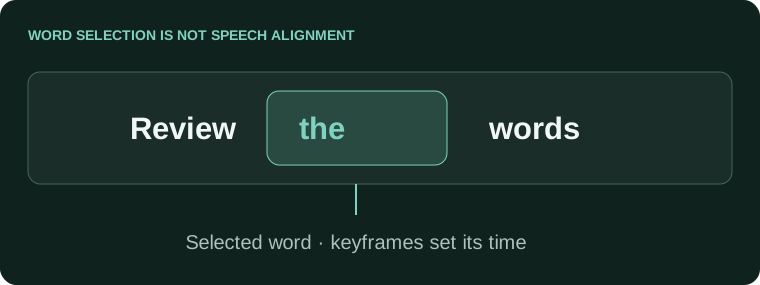
- Select a representative text layer and add an animator for the property you intend to change, such as opacity or position.
- Inspect the range selector and choose the appropriate selection basis for characters, words or lines.
- Animate the selector or property values within the layer's display interval.
- Preview the complete passage at real playback speed, then test a longer and a shorter text layer.
Adobe's text animation reference documents range selectors, Units and Based On. Character and word selections behave differently when text length changes. A preset copied successfully is not necessarily timed appropriately for its new sentence.
Give the words a stable interval
A caption remains on screen for 3.0 seconds.
A 0.2-second entrance and 0.2-second exit leave 2.6 seconds of stable display.
A 1.2-second entrance and 1.2-second exit leave only 0.6 seconds.
These figures illustrate the trade-off, not a universal standard. Preview real text and the intended audience's reading conditions. If the cue itself is too dense, fix its segmentation or timing rather than expecting an animation preset to solve the problem.
| Symptom | Review |
|---|---|
| Only the first few words animate correctly | Selection basis and the new text length. |
| The last words appear too late | Entrance duration and the actual speech timing. |
| Text jumps after a font change | Text bounds, alignment and anchor behavior. |
| Caption overlaps a following line | Layer out-points and copied keyframe timing. |
Reuse the design, then review every exception
- Short, long and multiline captions remain visible.
- The stable hold is sufficient for the actual text.
- Motion does not cover important picture details.
- The exported render matches the preview and approved words.
Keep the subtitle master and layer revision together so later wording corrections do not break the timeline unnoticed. For source preparation, use the Subtitle Editor. For the handoff itself, the separate After Effects subtitle workflow explains the file-to-layer checks.
AE word animation without unreadable captions
How do I animate words instead of individual letters in a text animator?
Use the selector settings, including Based On: Words, for your treatment. Test a simple text layer first. Character selection, word selection and the layer's overall transform can produce very different results.
Why does the next word fade in when I wanted an instant change?
Inspect selector smoothness, shape and keyframes rather than adding more effects immediately. Test the intended reveal on a short phrase, then compare it with the audio. Do not hide unreadable transitions behind a busy preset.
Can a range selector automatically match every spoken word from SRT timing?
Not from phrase-level boundaries alone. The selector controls which text is affected; it does not establish the recording's word onsets. Obtain or measure word timings when the effect needs accurate spoken-word highlighting.
Do I need an expression just to switch text at known times?
Not always. Source Text keyframes can switch the visible text at chosen points. Choose the simpler workflow that meets the brief, and keep its cue times checked against the recording rather than adding complexity unnecessarily.
How can I add a pop without rebuilding the caption animation?
Test a Scale property within the intended animator/selector setup on a copy. Check that the words remain readable and do not overlap. A successful position reveal does not automatically mean a scale treatment will behave identically.
Why does a preset look good on one line but jump around on another?
Line length, wrapping, anchors and selector ranges can change the result. Test the shortest and longest real captions. Build a small stress set before applying the effect across the composition.
Should the entire cue duration be used for the entrance effect?
Leave enough stable time to read. If a cue is mostly moving, fading or scaling, its nominal duration can overstate its usefulness. Shorten the effect or reconsider segmentation rather than making readers chase the words.
Can I use the same word-reveal setup for right-to-left text?
Test the actual script, paragraph direction, font and selector behavior. Do not approve it from an English sample. Ask a competent reader to check word order and readability in the rendered output.
Why do viewers complain about animation even though it follows the voice?
Synchronization is only one requirement. Rapid changes, moving positions and visual effects can compete with reading or the scene. Use restrained emphasis and test whether the sentence remains understandable without replaying it.
What should I preserve before turning the captions into a reusable animation template?
Keep the reviewed timed text, the editable composition and representative test cues. Document which properties the template expects. Check a correction and an unusually long line so future edits do not require rebuilding the treatment.