
WebVTT Captions Not Showing in HTML Video? Follow the Request to the Cue
When WebVTT captions do not appear, check whether the track file loads successfully, whether its contents are valid VTT and whether the player has selected the track. A .vtt filename alone is not enough. Work from the network response to the cue timings rather than repeatedly changing caption styling.
In this guide
Use AENural to separate syntax from hosting errors
- Open SRT to VTT, select Choose SRT file and load the original two-cue SRT sample. Check VTT ready and the two-subtitle count.
- Select Download VTT and open the saved file as text. Confirm its WEBVTT signature and first timing line: 00:00:01.250 to 00:00:03.750. The second cue ends at 6.500 seconds.
- Place that VTT at your own intended public asset path and set the track src to that actual path. Use a test video long enough to reach both cues. These invented captions are a display fixture, not a transcript matching your video.
- Inspect the exact track request, then select the caption track and seek to two seconds, inside the first cue. Only after this controlled test works should you substitute the full delivery file.
If the downloaded text is correct but your server returns an HTML page at the configured URL, another conversion will not fix the route. If the request returns real VTT but text remains hidden, inspect track selection and timing next. Keep each failure stage separate.
A cross-origin setup needs the media element and remote server configured consistently. Start with a permitted same-origin fixture when isolating the issue; do not disable security checks or assume a visible download link proves the player loaded the track.
Start with a minimal known structure
<video controls src="/media/lesson.mp4">
  <track kind="captions" src="/media/lesson.en.vtt"
    srclang="en" label="English" default>
</video>WEBVTT
00:00:01.000 --> 00:00:04.000
This is a test caption.
Keep the test caption inside the actual video duration. A valid cue starting at one minute will not appear while you inspect only the opening five seconds. These examples are illustrative files, not links to a hosted demonstration.
Check the file response before CSS
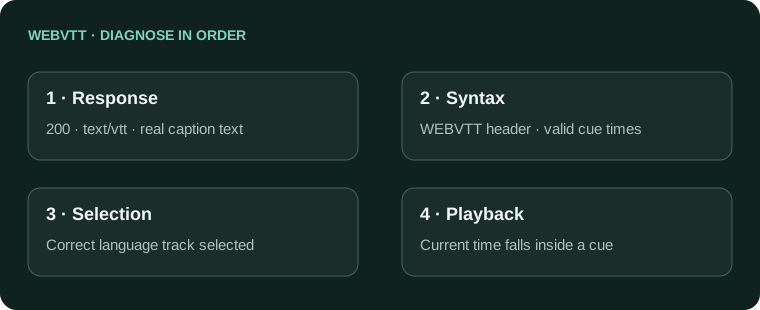
- Inspect the requested track URL using your development tools. Confirm it returns the actual text file, not a 404 page, login screen or application HTML fallback.
- Check that the file is served as text/vtt and saved as UTF-8.
- Confirm the WEBVTT signature, a blank header separator and valid period-based timestamps.
- If the file is on another origin, check the media element's crossorigin configuration and the server's permitted cross-origin response.
The MDN track reference documents its attributes and origin conditions. The WebVTT format guide describes file syntax. Renaming SRT to VTT does not implement those requirements.
Then check selection, timing and style
| Check | Reason |
|---|---|
| The track is selected | A loaded track is not necessarily displayed. |
| Current playback is inside a cue interval | Silence between cues is expected. |
| The label/language identifies the intended track | Another language track may be active. |
| Styling leaves readable text | Color or placement can hide text after loading succeeds. |
Test without custom caption CSS first, then add styling back deliberately. A player's default-track behavior can also reflect user preferences. Do not use hidden text injected into the page as evidence that a native video track works.
Test on the real hosting path
A working test file at one development URL does not prove the production asset path, MIME mapping and origin rules are correct. Verify the exact deployed track URL and the video page after deployment. Include keyboard access to the player's controls in the review.
- Track request returns the actual VTT with HTTP 200.
- Syntax, encoding and cue intervals are valid.
- The intended track is selectable and visible.
- The final hosting path and origin settings are verified.
For an existing SRT source, use SRT to VTT, then inspect the generated file. A converter can fix format syntax; it cannot configure your server or select the track in your application.
WebVTT requests that load but do not display
Why does the video load while the VTT request returns 404?
Inspect the exact track URL independently from the video. Check deployment path, filename case and static-file serving. A successful picture request does not prove the subtitle asset exists at the path in your track element.
The VTT request returns 200. Why are there still no captions?
Inspect the response body: it might be an HTML fallback rather than a VTT. Then check syntax, cue times and track selection. A status code alone does not establish that valid caption data reached the player.
Do I need the default attribute for captions to work at all?
No. The default attribute indicates a preferred track, subject to user preferences; it is not a universal requirement for validity. Confirm the track is selected or showing, and do not use default to mask a failed file request.
Why does a cross-origin VTT fail even when I can open its URL?
Check the media element's crossorigin configuration and the server's appropriate CORS response. A direct navigation and a caption-track fetch have different checks. Prefer a simple same-origin test before investigating more complex hosting.
Can a renamed SRT serve as a VTT track?
Not without valid WebVTT contents. Confirm the WEBVTT signature, timing syntax and encoding. Use SRT to VTT for a real conversion, then inspect the saved text rather than changing only its suffix.
Why do captions disappear only in one browser or layout?
Reduce the page to a known-good video/track example and compare request, track mode and styling. Keep the failing browser/version in your report. A historical engine-specific symptom is not proof that today's file syntax is wrong.
Should the server send my VTT as plain HTML?
No. Serve a valid WebVTT resource with the appropriate text/vtt type and actual subtitle body. Check routing fallbacks and host configuration, especially if the response contains your site's normal document instead of cues.
Can cue timing explain a perfectly valid file that appears empty?
Yes. Seek inside a known cue and compare its time range with the video's elapsed duration. An hour-offset file or cues beyond the test video's end can load successfully without showing words during the section you watch.
Why does testing the page directly from a disk file produce different behavior?
Use an HTTP development server for the intended web workflow. File-origin requests have different restrictions. Diagnose the served asset and origin behavior rather than weakening security settings to make one disk-file test appear successful.
How can I isolate my long subtitle file from the hosting problem?
Convert the two-cue SRT sample and test its VTT with a long-enough video. Seek to two seconds. Once that works, substitute your own file and compare what changes.