
Translated Subtitles Too Long? Fix Reading Load Without Changing Meaning
If a subtitle translation is too long to read, check line wrapping, cue segmentation and available display time before shortening the wording. After translating an SRT file, compare the target text with the recording. Preserved timestamps alone do not establish a readable translation. Extending every cue can create overlaps, while shrinking the font can make the entire video harder to read.
In this guide
Repair one difficult cue in AENural first
- Open AENural’s Subtitle Editor, select Upload subtitle file and choose the reviewed target-language SRT or VTT. Preserve both this file and the source-language master.
- Inspect the dense cue’s Subtitle text, Start, End and CPS indicator. If only the wrapping is awkward, move the line break inside the text field while keeping the wording and times.
- If the sentence genuinely needs another cue, use Add below. Divide the text at a meaningful phrase boundary and enter each cue’s measured Start and End against the recording. Do not distribute words evenly merely to fill the available space.
- Download the corrected format and review the changed sequence with a competent target-language reader, including the neighboring captions.
In the 72-character example, extending the cue to four seconds lowers the calculated rate to 18 CPS. First check whether the next caption begins before that new end. If it does, a longer duration can replace one readability problem with a collision or late text. Keep a change only when both the language and the timing remain correct.
For an accidental collision, Subtitle Overlap Fixer provides Shorten earlier subtitle and Move later subtitle. Neither strategy knows the target sentence’s meaning. Review its proposed effect and use Undo fixes if a timing repair makes a line too brief or misaligned.
Record an intentional condensed translation separately from a spelling correction. The next reviewer should be able to tell why a qualifier or phrase changed, rather than having to reconstruct the decision from the exported file.
Identify which constraint is failing
| Problem | Review |
|---|---|
| The line exceeds the usable width | Font, frame size and meaningful line breaks. |
| The block fits but flashes too quickly | Reading load and available display duration. |
| One cue contains several thoughts | Segmentation and speaker/context boundaries. |
These constraints can overlap, but changing all of them at once hides the cause. Keep a copy of the translation and make a controlled pass on a representative difficult passage before applying broad changes.
Use a timing example to expose the trade-off
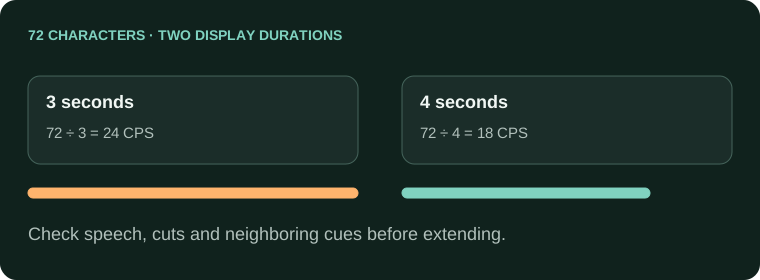
A target-language cue contains 72 characters under one counting convention.
At 3 seconds: 72 ÷ 3 = 24 characters/second.
At 4 seconds: 72 ÷ 4 = 18 characters/second.
The extra second is useful only if it fits the actual speech/scene and neighboring cues.
The calculation does not prescribe a universal limit. Use the target language's delivery rules where supplied. Netflix's timed-text style-guide directory illustrates why language-specific guidance matters; its specifications apply to its own deliveries.
Choose a repair with language review
- Check whether a better phrase-level line break solves the width problem without changing words.
- If the text spans several ideas, split at a meaningful boundary and retime each part against the recording.
- Use available surrounding time only where it remains synchronized and does not collide with neighboring captions.
- If wording must be condensed for the delivery brief, ask a competent target-language reviewer to preserve the original meaning and tone.
Do not delete a qualifier, negation or unit merely to reduce a warning count. A caption that fits a box but changes the claim is not an improvement. Keep a record of intentional condensation, separate from corrections to mistranslations.
Recheck the surrounding sequence
- The shortened or split text still communicates the intended meaning.
- Neighboring cues remain synchronized and readable.
- Speaker changes and important sounds remain clear.
- The actual exported font and frame reproduce the reviewed layout.
Use the Subtitle Editor for individual revisions and the Overlap Fixer for reviewed accidental collisions. Automatic overlap repair does not decide how a sentence should be translated; language and timing checks must work together.
Long translations without lost meaning
The translation is correct but I have to pause to finish reading. What should change?
Review display duration, segmentation and competing notes with a target-language reader. Correct words can still arrive too quickly. Start with a difficult cue rather than shrinking every caption or blaming the viewer's reading speed.
Should I simply make translated captions stay longer?
Only when the recording leaves usable time. Extending into another speaker or scene can create overlaps and misleading presentation. Check neighboring cues before changing the end, and resegment when appropriate.
Will moving the line break solve a translation that takes too long to read?
It can improve phrase grouping, but it does not reduce the amount of text or add display time. Check reading load separately. Keep names and grammatical units together where practical without treating layout as a timing repair.
Can I shorten the translation automatically until the warning disappears?
Do not silently change meaning to satisfy a number. Review any condensation with someone competent in the target language. Preserve negations, names and necessary qualifiers, and record approved changes to the translated master.
Why are subtitles and dubbed dialogue saying different things?
They may have been adapted for different purposes or come from different tracks. Confirm which language asset you selected. Do not treat one mismatch as proof of a particular production cause without checking the original scene and approved translation.
Do explanatory brackets make captions harder to follow?
They can increase reading load, especially beside dialogue and other on-screen text. Include only useful context required by the brief, and review timing. Do not add lengthy explanations that viewers cannot read before the next cue.
Can I split a long target sentence into two cues with equal durations?
Use measured speech and meaningful phrase boundaries instead. Equal division is not evidence of good timing. Add the cue in Subtitle Editor, then review both new ranges and their neighbors against the recording.
Is the same character count equally readable in every language?
No. Script, vocabulary and reading behavior matter. Follow the destination's language-specific guidance and use competent review. A single English threshold is not a universal rule for all translations.
Why did the next subtitle get the wrong translated words after I edited one line?
Check cue mapping and whether the translation process split or merged entries. Compare the surrounding source/target records before retiming. Fixing an end time cannot solve text that has shifted to the wrong cue.
What should I test after fixing one crowded translated passage?
Replay that cue with its neighbors, inspect the downloaded file and ask a target-language reader to check meaning and pace. Then sample other difficult sections; one successful repair does not approve the entire translation.