
How to Split an SRT File: Keep or Reset the Timestamps?
To split an SRT file in AENural, choose your file, select a split method, then decide whether to keep or reset its timestamps. Keep original times for work against the complete video. For separate clips, reset only when the tool's reset boundary matches the start of the corresponding clip.
In this guide
1. Open your subtitles in AENural
Open the SRT Splitter and select Choose SRT file. It accepts one SRT file up to 10 MB. Keep your original separately. For this walkthrough, download the five-caption sample, which contains invented text and timestamps, then choose that file.
After loading, check the filename, subtitle count and Subtitle timeline. The sample contains five cues and ends at 00:01:28,000. That timeline describes the last caption end, not the video's duration. SRT stores text and timing rather than the media itself, as the Library of Congress format reference explains.
2. Choose how to split
| Control | What it does |
|---|---|
| Number of parts | Distributes cues into balanced groups. Five cues into two parts becomes three plus two; video durations need not match. |
| Subtitles per file | Limits each file to your chosen cue count. The final file can contain fewer. |
| Time interval | Groups cues by their start times within repeating intervals. Enter minutes under Split every, such as 1 or 0.5. |
For the sample, select Time interval and enter 1 under Split every. Results update without a separate Split button. Two output files should appear. Empty intervals are skipped; they do not produce blank subtitle files. A run can create up to 100 non-empty parts.
3. Compare original and reset times
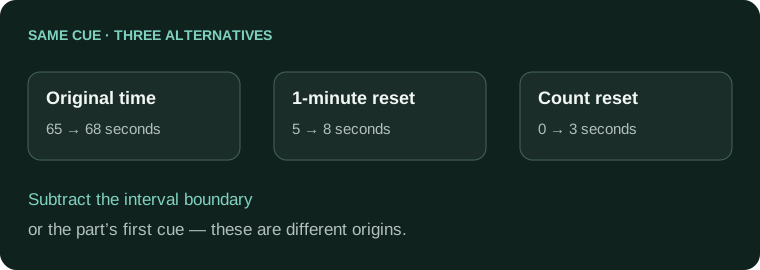
- Under Subtitle times, select Keep original times. In Your output files, Part 02 starts at 00:01:05,000. This copy still refers to the full recording.
- Select Reset times for each part. With one-minute intervals, Part 02 now starts at 00:00:05,000. Its interval begins at 60 seconds, so the five-second lead-in remains.
- Switch to Number of parts, enter 2, and keep reset selected. Part 02 now starts at 00:00:00,000 because count-based splitting subtracts that group's first cue start: 65 seconds.
Original:          00:01:05,000 --> 00:01:08,000
1-minute interval: 00:00:05,000 --> 00:00:08,000
2 balanced parts:  00:00:00,000 --> 00:00:03,000
If your second video starts at original time 60 seconds, the interval result preserves its opening pause. The count-based result would display this line five seconds early. Choose using the actual video cut, not simply because both options say reset.
Watch captions that cross an interval
If your video is cut exactly at 60 seconds, review that spoken sentence in both clips. Adjust the affected cue in the Subtitle Editor if necessary. The splitter divides subtitle files; it does not cut video or automatically rebuild dialogue across an edit.
If the expected parts do not appear
Read the message beside the value field before changing the file. If all cues fall within one interval, choose a shorter interval. For this sample, two minutes would produce only one group and is rejected. If you request more parts than there are cues, reduce the number; five captions cannot become six non-empty files.
Enter decimal minutes, rather than a clock timestamp, in Split every. For example, 0.5 means thirty seconds. A VTT file needs conversion through VTT to SRT before this SRT-only workflow.
4. Download the parts and check playback
Return to your intended settings. Select Download all parts (ZIP), or use Download part 01 and the other individual buttons. Each output restarts cue numbering at 1 and receives a numbered filename.
Open each downloaded SRT and compare its first and last lines with the results panel. Then load it beside its matching video. Check the opening pause, a middle line and the final caption. If timing is consistently wrong, correct that part with the SRT Timing Adjuster. Keep the original until every part matches its intended recording.
Splitting subtitles for real clips
Why do captions from my new clip still start several minutes in?
The extracted cues may retain full-programme timestamps. For a standalone clip, subtract its actual source in-point. Keeping original times is useful only when the captions will still play against the complete recording.
Should resetting always make the first spoken word start at zero?
No. A clip can begin with silence. Reset to the clip's true start, not automatically to its first caption, unless those are the same moment. Otherwise the first words can appear too early.
Why do count-based and interval-based resets give different opening times?
They use different reference boundaries. AENural's count reset uses the part's first cue; interval reset uses the interval's start. Compare both with your video cut before choosing which output matches it.
Does splitting an SRT also cut my video into matching clips?
No. SRT Splitter creates subtitle files. Cut the recording separately and keep a record of its in-points. Matching part numbers alone do not prove that media and captions share the same boundaries.
What happens to a caption that crosses the split time?
AENural keeps a crossing cue whole in its assigned part. That preserves its text but does not decide which words belong inside your clip. Review and trim the boundary cue against the actual recording.
Can I remove captions from only selected sections of a video?
Yes, by editing a working subtitle copy or the caption layer in your editor. Remove only the intended cues, and check that the remaining captions retain their original timing where the video itself is unchanged.
Why didn't splitting produce the number of downloadable parts I expected?
Some requested parts may contain no cues. AENural produces nonempty outputs, subject to its displayed limits. Check cue distribution and split settings instead of assuming a missing part contains lost dialogue.
Do I need to generate captions again after extracting a straight excerpt?
Usually you can reuse the reviewed episode cues with the correct offset and boundary edits. New transcription is unnecessary when the words are already accurate and the only change is a continuous cut.
Will one reset still work after I remove pauses inside the clip?
Not for every cue. Internal cuts create additional timing changes. Adjust the affected sections to the new edit, then check speech at the opening, each cut and the end.
How can I check reset behavior before using my full subtitle file?
Try the five-caption practice file. Compare a cue's original time with its interval-reset and count-reset outputs, then repeat with the actual in-point of your own video clip.