
How to Merge SRT Files With the Correct Video Offsets
To merge SRT files in AENural, add the chapter files, arrange their order, set the gap and inspect each join before downloading. The crucial detail is the offset: AENural uses the preceding chapter's last subtitle end, plus your gap. It cannot infer the full video duration from an SRT file.
In this guide
Check the chapter boundaries first
Use this workflow for consecutive video chapters with their own subtitle timelines. Keep the source files and the final assembled video. Write down when each chapter starts in that finished edit, including transitions, title cards and silence.
The Library of Congress SRT reference describes caption text and start/end timestamps. Those timestamps do not identify a video's full running time. A chapter's final spoken line can finish several seconds before its picture ends.
1. Add and arrange your SRT files
- Open AENural's SRT Merger and select Choose SRT files. Add between two and ten files; each can be up to 10 MB, with a combined 50 MB limit.
- Under Merge order, confirm the first file belongs to the opening chapter. Use Move up or Move down on a file row to correct its position.
- Use Add more SRT files for another chapter. If you chose the wrong version, use that row's Replace file control rather than rebuilding the whole queue.
Arrange by the final video sequence, not by filename sorting. Two files called part-2 and part-10 can be confusing in an alphabetical list. Reordering also changes the calculated joins, so inspect them after any move.
2. Set the gap using a worked example
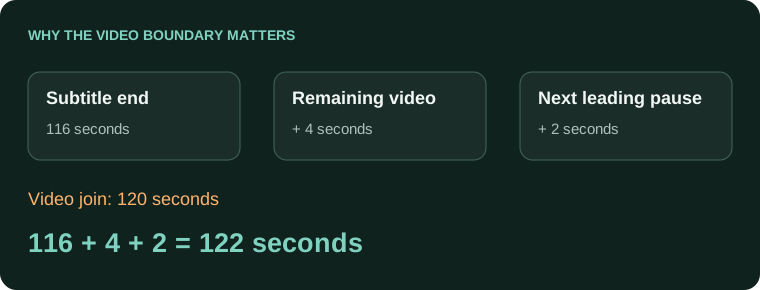
Under Gap between files, enter the extra seconds needed after the previous subtitle ends. The same gap applies at every join. The next file's original opening pause is retained; its first cue is not automatically pulled forward to the join.
| Measurement | Time |
|---|---|
| Chapter A video ends | 120 seconds |
| Chapter A last subtitle ends | 116 seconds |
| Chapter B first subtitle starts in its own file | 2 seconds |
| Required gap in AENural | 4 seconds |
| Chapter B first subtitle in the joined video | 122 seconds |
116 + 4 + 2 = 122 secondsEnter 4, rather than 6, in the gap field. The two-second pause is already present in Chapter B's timestamps. Adding it again would make the result late. If you leave the gap at zero, that caption starts at 118 seconds, four seconds early for this example.
3. Inspect every join before downloading
In Check the file joins, read Ends at, Gap and Starts at for each boundary. For the example, the previous caption ends at 00:01:56,000 and the next starts at 00:02:02,000. That six-second caption-to-caption interval includes both the four-second gap and Chapter B's two-second lead-in.
A file already timed against the full assembled video needs a different operation. Appending it here adds another offset. Likewise, two language tracks for the same film should not be joined end-to-end. AENural's merger is a sequential chapter workflow, not bilingual interleaving.
4. Download and test the joined captions
Select Download merged SRT. The output has consecutive cue numbers. Open it in the Subtitle Editor if you need to inspect individual words or times, then load it with the final video.
- Check the opening line and the first line after every chapter boundary.
- Compare total caption count with the sum of your source files.
- Verify the last line and any caption near a transition.
Keep the source chapters until delivery is approved. A valid merged subtitle file can still be mistimed against a different video cut.
Joining chapters without losing sync
Why can't I just paste ten SRT files together?
Chapter files often restart at zero. Pasting keeps those repeated timelines, so captions overlap or appear in the wrong chapter. Renumbering alone does not apply the offsets needed for the assembled video.
Can AENural tell how long each video chapter lasts from its SRT?
No. Subtitle text records cue times, not the full chapter duration. Note the real chapter boundaries in the finished video and account for any silence after the last caption before joining the next file.
Why does the second chapter start too early after merging?
Compare its first cue with the video's actual chapter start. AENural offsets from the previous file's last subtitle end plus the chosen gap; an uncaptioned outro can therefore require additional spacing.
Should the gap equal the pause between spoken sentences?
Use the gap to match the chapter boundary in this workflow, accounting for the next file's own leading time. A conversational pause and a video chapter offset are not necessarily the same measurement.
Can I join files that already use whole-programme timestamps?
Do not apply another chapter offset blindly. Compare the time origins first. Files already timed to the assembled programme may need a different assembly workflow, otherwise you will shift their captions twice.
How do I reuse a timed intro or song in several episodes?
Keep its relative cue spacing, then place a copy at each episode's measured start point. Verify the matching recording and the surrounding cues. Do not change the shared original while adapting an episode copy.
The first half is correct, but an intermission makes the second half early. Should I shift everything?
No. Preserve the correctly timed first half and adjust only the affected section. A whole-file shift would damage the part already in sync. Check a recognizable line immediately before and after the break.
What happens if I merge translated captions as if they were consecutive chapters?
They will not become selectable language tracks. Keep separate language files unless the intention is genuinely sequential chapters. Joining two translations of the same scene creates duplicated content on an inappropriate timeline.
Does a successful merged download prove every join is correct?
No. Inspect the last cue before each join and the first after it against the finished video. Also check chapter order and any transition, title card or uncaptioned silence between sections.
What can I do if the merger rejects my chapter set?
Check the displayed input limits and each file's validity. AENural accepts 2–10 files, with a combined 50 MB limit. Repair the rejected source before splitting the job into smaller, clearly tracked assemblies.