
How to Fix Overlapping Subtitles Without Cutting Off Speech
To fix overlapping subtitles in AENural, load your SRT file or VTT file, review each conflict, then choose whether to shorten the earlier cue or move the later one. Exclude intentional overlaps before applying changes. A clean overlap count does not prove the captions follow speech, so check every changed transition against the recording.
In this guide
1. Find the actual collision
Open the Subtitle Overlap Fixer and select Choose subtitle file. The tool accepts SRT or VTT up to 10 MB and 10,000 subtitles. After loading, the analysis reports how many adjacent overlaps it found.
If the file is rejected for invalid or out-of-order times, correct those cues in the Subtitle Editor first. This repair workflow does not silently reorder a damaged track. Check that the selected subtitles match the video version before changing any timing.
An overlap means one caption remains visible after the next begins. In each issue card, compare Before times, then expand Show subtitle text. Listen to those lines in your video. A guest interrupting a host may justify simultaneous information; a lingering caption after its speaker stops is a different problem.
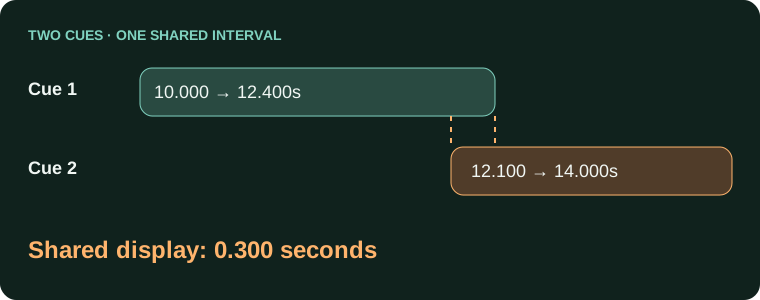
Subtitle 1: 10.000–12.400 seconds
Subtitle 2: 12.100–14.000 seconds
Shared display time: 0.300 seconds
2. Choose the repair that matches the speech
| Control | Effect | Check before using |
|---|---|---|
| Shorten earlier subtitle | Moves the earlier caption's end before the next start. | Its words remain visible long enough to read. |
| Move later subtitle | Moves the following caption later while keeping its duration. | Its new start still follows its spoken words. |
| Minimum gap | Sets spacing between the repaired cues, in seconds. | Use your delivery requirement; larger is not automatically better. |
For the example, shortening with a 0.1 second gap ends Subtitle 1 at 12.000 seconds. Moving instead starts Subtitle 2 at 12.500 and ends it at 14.400. Both remove the collision, but only the recording tells you which timing makes sense.
Choose Shorten earlier subtitle if the first speaker has already finished and the line has enough reading time. Choose Move later subtitle if the second cue starts prematurely. If both speakers really overlap, neither blanket choice necessarily represents the conversation well.
3. Exclude intentional cases and apply
- Review each issue's text and times. Uncheck Fix this overlap on any case you want to retain for manual treatment.
- Enter your chosen Minimum gap, or use a quick setting such as 0s or 0.1s. The field accepts up to ten seconds; that is a control limit, not a readability recommendation.
- Select Fix selected overlaps, whose button count reflects your selection. Read the repaired and remaining totals, then compare Before with After fix on each changed card.
Use Undo fixes to restore the original timing if a trial shortens an important line too much or moves speech out of sync. For an individual exception, use the Subtitle Editor to edit its Start and End fields deliberately.
When an overlap is not a file error
WebVTT's cue-timing rules allow overlapping cues. That does not guarantee your destination displays them clearly, but it means every overlap is not automatically invalid. Follow the destination's specification and preserve necessary dialogue or sound information.
Two cues meeting at exactly the same timestamp have no positive-duration overlap. A requested visible gap is a separate delivery decision. Likewise, shifting the entire track earlier or later does not change the relationship between neighboring cues.
4. Download and replay the changes
Select Download fixed SRT or Download fixed VTT, according to your input. Test the exported file with the correct final video, including every changed transition. Check that no caption flashes too briefly or appears after its speaker finishes. Keep your original subtitles and review intentional overlaps separately before sharing the repaired version.
Overlapping captions and missing lines
Why does the second subtitle replace the first instead of appearing underneath it?
Players handle overlapping SRT cues differently. Inspect their time ranges and determine whether both lines should be one cue or two separately timed events. Do not assume the file's row order controls on-screen stacking.
Why are two simultaneous lines displayed in reverse order?
The player's collision rules can stack later cues above earlier ones. For one continuous thought with identical timing, consider a single cue with a meaningful line break. Preserve separate events when the content requires them.
Should I remove every overlap the checker finds?
No. Simultaneous dialogue or a sign alongside speech can be intentional. Review the recording and delivery format first. An overlap tool identifies time conflicts; it cannot decide which information viewers need.
Why did two lines merge after saving and reopening in another editor?
The export or importer may normalize overlapping cues. Compare the saved file with the original. Preserve an ASS master when its separate events and styling matter, and test the SRT required by the receiver.
Is shortening the earlier cue always the right repair?
Only when it still leaves enough time to read and follows the speech. Otherwise move the later cue, resegment the text or retain an intentional overlap in a suitable format. Replay the transition after editing.
Can I fix a full sentence split across identical timestamps?
If the entries are fragments of one thought, combine their text in the intended order under one valid time range. Check that they are not different speakers before merging them into a single caption.
Why do subtitles keep accumulating even though individual durations look normal?
Test the file in another player and inspect the actual end times and cue structure. A persistent display problem needs diagnosis; repeatedly shortening normal cues may hide the symptom while making the captions harder to read.
Will adding a tiny gap automatically make the captions readable?
A gap can separate adjacent events, but its suitability depends on speech, frame timing and delivery rules. It is not a substitute for checking the text, duration and whether an overlap was intentional.
What should I do when the overlap is an on-screen sign and spoken dialogue?
Keep both meanings available. Use a format and player that support the required presentation, or make a deliberate combined cue. Blindly deleting the earlier event can erase the sign before viewers can read it.
How do I verify AENural's overlap repair?
Download the corrected file and inspect each changed transition against the recording. Compare cue count and wording too. A lower issue count alone does not prove that no speech or useful text was lost.