
SRT File Not Working? Check These Syntax Errors First
When an SRT file is rejected, check the actual filename and plain-text contents before changing timing. A conventional SRT cue needs a number, a valid start/end time, caption text and a blank separator. Repair one error at a time on a copy, then import it again to identify the cause.
In this guide
Compare with a small valid cue
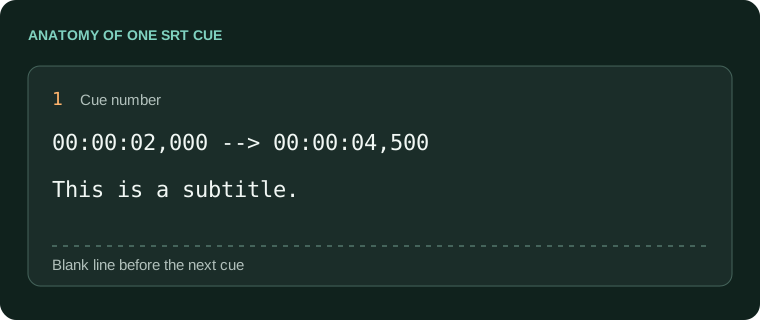
1
00:00:02,000 --> 00:00:04,500
This is a subtitle.
The caption above lasts 2.5 seconds. The arrow is two hyphens followed by a greater-than sign, and milliseconds follow a comma. Word-processing software can introduce typographic characters or rich-text formatting that looks similar but changes the file.
The Library of Congress SRT reference describes the conventional sequence of numbered blocks. Because SRT implementations differ, a file accepted by one editor is not a guarantee that a stricter upload form will accept it.
Work through the structural checks
| Check | Repair |
|---|---|
| Filename ends in .srt.txt | Show file extensions and save a real plain-text .srt file. |
| Timestamp uses 00:00:02.000 | Use conventional SRT comma milliseconds, not VTT punctuation. |
| End is before or equal to start | Compare the recording and assign a positive display duration. |
| Two cues run together | Insert a blank line between complete cue blocks. |
| File contains rich-text commands | Export plain text from the source; do not rename an RTF file. |
Inspect the first rejected cue and the block immediately before it. A missing separator can make an error appear to belong to the following caption. Keep dialogue punctuation untouched while correcting the timestamp line.
Separate a bad file from an import problem
- Create a separate test file using the sample structure above. Do not overwrite the original subtitles.
- Import it into the receiving application through its caption/subtitle workflow, rather than opening it as video.
- If the test imports, repair the original in small sections until the failing block is isolated.
- If neither file imports, check the receiver's supported formats, permissions and current help instructions.
For YouTube, the official supported-file guide specifies basic UTF-8 SRT and says SRT styling markup is not recognized. Strip unsupported delivery features only from an export copy, preserving your editable master.
A native HTML video track expects WebVTT rather than raw SRT. In that case, use the SRT to VTT converter. Syntax conversion and timestamp repair are separate tasks.
Check the corrected file in AENural
- Open the Subtitle Editor and select Upload subtitle file. Choose your repaired SRT copy. If structural parsing still fails, use the reported cue to inspect the plain-text file first; the editor cannot load every malformed document.
- After import, inspect the affected Subtitle text, Start and End fields. SRT times use HH:MM:SS,mmm. For the example above, enter 00:00:02,000 and 00:00:04,500.
- If export reports subtitles needing attention, select Review issues. Correct the indicated fields before downloading; a warning about reading speed is different from an invalid time that blocks export.
- Select Download SRT, reopen the exported copy and import it into the application that originally rejected the file.
Do not rename a VTT file to bypass an SRT-only upload. AENural's editor can open supported SRT or VTT and export the intended format, but switching formats may discard settings the receiving format cannot represent. Preserve the original for comparison.
Verify without introducing another error
- Reopen the exported file and check its extension and encoding.
- Compare cue count and the first/last spoken lines with the original.
- Play several cue transitions to catch missing separators or accidental overlap.
- Keep a record of the specific repair so you can reproduce it on the next export.
If the export works in AENural but fails at the destination, try the same small valid sample there. That separates a receiver-specific restriction from damage in your longer file.
A successful import establishes that the file can be read; it does not establish that its words, language or synchronization are correct. Review those against the final recording before delivery.
When an SRT is rejected
The SRT has the same name as my video. Why does it still not load?
A matching name helps some players discover the file; it does not validate its contents. Open the SRT as text and confirm it contains cue numbers, valid timing lines, words and blank separators.
A subtitle validator says my file is invalid, but I can see captions online. Why?
The downloaded file may be blank, incomplete or different from the displayed track. Inspect its actual contents and size. Captions visible on a website do not prove that your downloaded SRT contains those captions.
Can I turn a normal transcript into SRT just by renaming it?
Only text already arranged as valid timed cues can work that way. A reading transcript lacks measured cue start and end times. Add real timing against the recording rather than inventing evenly spaced timestamps.
Why does the upload form say the extension is wrong when it ends in .srt?
Show full filename extensions and check for .srt.txt. Then inspect the contents and test a known-good file. If the same valid file works elsewhere, record the failing app and upload behavior for support.
What should one valid SRT timing line look like?
Use conventional hours, minutes, seconds and comma-separated milliseconds, with an arrow between times: 00:00:02,000 --> 00:00:04,500. Keep the end after the start and the caption text on the following line.
Do missing blank lines really matter?
They separate cue blocks. Removing them can make a parser treat several captions as one malformed block. Restore the separators on a copy, then import it again before making unrelated timing changes.
Can an SRT contain accented names and non-Latin text?
Yes. Use a correctly decoded UTF-8 copy for destinations that require it. Strange symbols are an encoding problem to investigate, not evidence that names or entire writing systems must be removed.
Why did converting an invalid subtitle to another format produce nothing?
A converter needs usable input cues. It cannot recover text from an empty file or infer missing dialogue. Return to the source export and establish whether words and timestamps exist before trying another conversion.
Can I get an editable SRT from captions already burned into the picture?
A picture does not contain the original editable text track. You need the source subtitle file, or a separate recognition process followed by review. Renaming the video or saving an empty SRT cannot extract it.
How do I tell whether the file or the player is at fault?
Try the two-cue sample in the same player. If that works, compare your file's structure and times. If both fail, check track selection, playback time and player support.