
WAV vs MP3 for Transcription: What Actually Changes?
Use a clear supported recording for transcription, preserving an uncompressed PCM WAV master when you have one. MP3 can be a practical smaller input, but converting an existing MP3 to WAV does not restore information lost earlier. Format choice is one part of audio quality, not a guarantee of transcript accuracy.
In this guide
Compare the two inputs with the same AENural settings
An MP3 audio-to-text converter cannot repair detail that was lost before the file reached it. To decide whether a smaller copy is adequate, compare a meaningful short passage rather than exporting a whole project in several formats.
- Open AENural’s audio-to-text converter and select Upload Audio. Choose a short PCM WAV passage from your original source.
- Set Spoken Language explicitly and keep Text Language at Same as spoken language. Select Convert to Text and save the result with Download TXT.
- Repeat with an MP3 made from that same passage, using the same language and transcription settings. Keep the two exports under distinguishable filenames.
- Compare the words against the source recording. Record specific differences in a name, a quiet word and a number; do not assume the larger file wins because of its size.
If both drafts make the same mistake in an unfamiliar name, supply the verified spelling during review. If the WAV cannot be decoded, check its encoding: a .wav extension alone does not establish that it contains supported PCM audio. A format-import failure and a wrong recognized word are separate problems.
When comparing inputs in a free audio-to-text converter, check that the free allowance covers both samples and their downloads. Use whichever supported input preserves intelligible speech without an unnecessary conversion. Keep the best original as your reference, even when a smaller MP3 becomes the practical working copy.
The source matters more than the extension
A quiet, well-recorded conversation saved as MP3 can be easier to transcribe than a noisy WAV. Distance from the microphone, overlapping speech and distortion remain audible problems regardless of the filename. Keep the best original recording rather than repeatedly exporting through different formats.
| Input | Benefit | Limitation |
|---|---|---|
| Uncompressed PCM WAV | Avoids a new lossy encoding step. | Larger files can exceed a service's input limit. |
| MP3 | Usually smaller and convenient to exchange. | Lossy encoding can remove information; repeated conversion cannot recover it. |
| MP3 converted to WAV | May meet an application's accepted-format requirement. | Does not recreate the original uncompressed source. |
The Audacity format reference distinguishes PCM WAV from lossy MP3. WAV is a container that can carry different encodings, so 'all WAV is uncompressed' is too broad.
Compare without changing several variables
- Keep one original recording and choose a short representative passage with difficult speech.
- If you have the uncompressed source, make supported input copies from that source rather than converting one lossy copy repeatedly.
- Use the same transcription language and settings for the comparison.
- Compare actual errors in names and words; do not infer an accuracy percentage from file size.
A small comparison can help choose an input for your recording. It is not a benchmark proving one format wins across languages, models and microphones. Avoid attributing a different result solely to the extension when processing settings or audio content also changed.
Estimate size before a long export
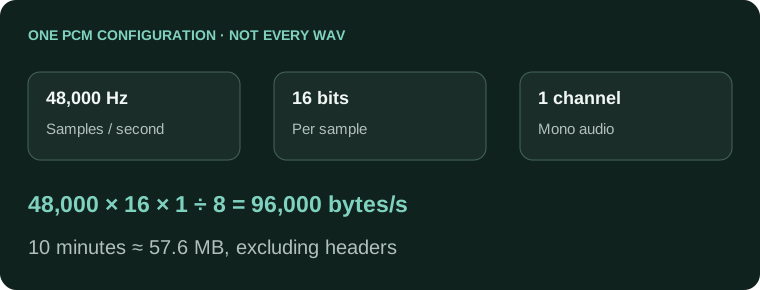
48,000 samples/second × 16 bits × 1 channel ÷ 8
= 96,000 bytes/second
Ten minutes: about 57.6 MB of sample data, excluding headers.
This arithmetic describes one PCM configuration, not every WAV file. Stereo doubles sample data at the same rate and bit depth. Check your tool's actual limit before preparing a long file, and do not reduce quality more than necessary merely to get under it.
Choose once, then spend effort on review
- The file plays clearly and contains the intended speakers.
- Its codec and size meet the receiving tool's requirements.
- No unnecessary repeated lossy export was introduced.
- The transcript is checked against audio regardless of format.
Use the audio-to-text converter with a supported input and review the result. A better export may prevent avoidable damage, but it will not resolve a word that was never intelligible in the original recording.
Audio format choices before transcription
Will converting an MP3 to WAV recover words the recognizer missed?
It does not restore detail already discarded by lossy compression. Keep the best original and test the difficult passage. If both versions contain the same damaged speech, a larger file alone will not solve the recognition problem.
Does WAV always mean uncompressed audio?
No. WAV is a container that can hold different encodings. Specify uncompressed PCM when that is what you need, and check the actual file information rather than deciding from the .wav extension alone.
Why is my WAV much larger without giving me a better transcript?
Uncompressed PCM stores sample data directly, while MP3 uses lossy compression. The size difference does not measure recognition accuracy. Compare actual words against the same source passage and keep language and quality settings consistent.
Is there one MP3 bitrate that guarantees accurate transcription?
No. Microphone distance, distortion, overlap, language and earlier encoding all matter. Avoid a universal bitrate promise. Test a representative passage and keep a clearer original when one is available.
Should I repeatedly export smaller MP3s until the upload works?
Avoid unnecessary repeated lossy encoding. Identify the size or format restriction first, then make a suitable copy from the best source. Splitting a long recording can be preferable to repeatedly damaging the same compressed copy.
Can I compare a WAV passage with a different MP3 passage?
That is not a useful format-only comparison. Use the same source passage, with the same language and transcription settings. Differences in speakers, noise or wording can otherwise explain the changed result.
Why does one WAV fail to import while another works?
Check codec, channels, sample rate, size and whether it plays completely. A supported extension does not guarantee every encoding is readable. Re-export a copy only after identifying the incompatibility.
Should I throw away the larger original after making an MP3?
Keep the best original while you review and edit. It remains your reference for unclear words and later exports. A convenient working copy should not become the only surviving source by accident.
Can an M4A be as useful as an MP3 for a voice recording?
A clear, supported M4A may be a suitable input. Inspect its actual encoding and playability. Choose by the recording and receiving tool's support rather than treating an extension as an automatic quality ranking.
How should I compare the two formats in AENural?
Process the same short passage with identical Spoken Language, Text Language and Transcription Quality choices. Download both TXT results and check a name, quiet word and number against the original audio.